Reduce Newsletter Spam: 5 Steps for Email Privacy
Reducing newsletter spam and improving deliverability requires system-level fixes, not one-off tweaks. This guide presents five practical steps teams can act on immediately: set up proper authentication, keep lists clean, write filter-friendly content, protect your sender reputation, and improve signup and security UX to cut complaints. The common problem isn’t a single mistake but a mix of weak authentication, stale lists, trigger-heavy copy, and clunky signup flows — the solution is an integrated approach that addresses each vector. Below you’ll find clear definitions, step-by-step implementation tips, EAV-style comparison tables for technical choices, and checklists you can use now to see fewer spam complaints and better inbox placement (references and KPIs reflect guidance current as of 06/2024).
How Can Email Authentication Help Reduce Newsletter Spam?
Email authentication tells inbox providers which senders are legitimate and which are not. When domains and sending IPs can be validated, spoofing drops, spam scores improve, and inbox placement gets better — which in turn protects open rates and sender reputation. Authentication also unlocks reporting that helps you spot abuse and act quickly. Below is a practical comparison showing what each protocol checks, where it lives in the delivery chain, and a checklist to implement them in the right order.
What Are SPF, DKIM, and DMARC Protocols?
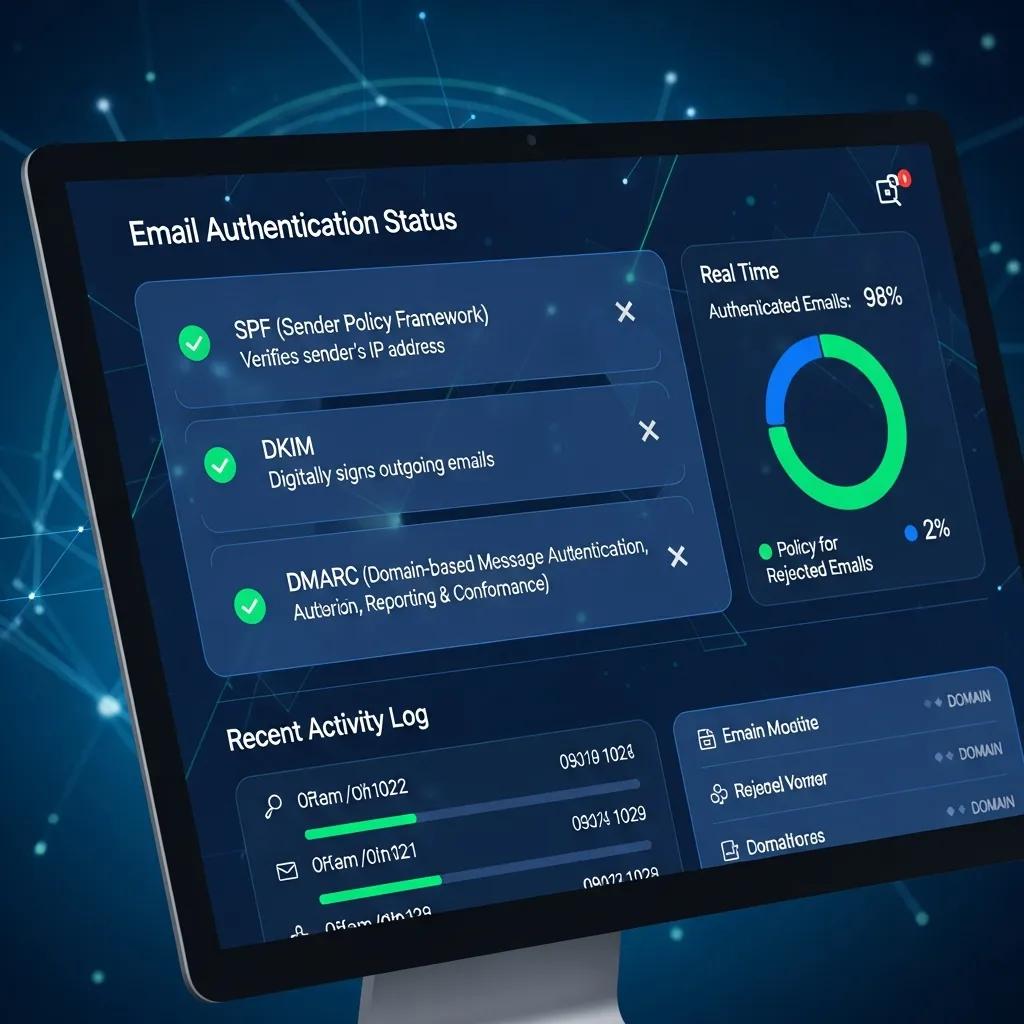
SPF, DKIM, and DMARC work together to prove message legitimacy. SPF lists which IPs may send for your domain via DNS, DKIM adds a cryptographic signature to message headers to verify integrity, and DMARC ties SPF/DKIM results to a policy and reporting mechanism. Think of it as SPF verifying the source IP → DKIM verifying the message → DMARC telling receivers what to do if checks fail. Industry best practice is to implement all three so major providers (Gmail, Outlook, etc.) can trust your mail. Proper DMARC setup also yields aggregate reports that highlight abuse patterns and guide corrective action over time.
DMARC: Authentication, Reporting, and Conformance for Enhanced Email Security
To mitigate email spoofing, security extensions like SPF and DKIM were developed. Domain-based Message Authentication, Reporting, and Conformance (DMARC), introduced in 2012, lets domain owners publish DNS policies that tell receivers what to do when SPF or DKIM checks fail. DMARC records also request machine-generated reports from receivers to designated addresses, helping domain owners spot and evaluate spoofing risks.
Quick checklist before the table: the comparison below summarizes what each protocol checks, where to configure it, and the deliverability impact you can expect when it’s set up correctly. Use it to prioritize DNS updates and ESP configuration.
| Protocol | What it Verifies | Where it's Configured |
|---|---|---|
| SPF | Which sending IPs are permitted for a domain | DNS TXT record |
| DKIM | Message integrity via a cryptographic signature | DNS TXT (public key) + signing settings in ESP/MTA |
| DMARC | Connects SPF/DKIM results to policy and reporting | DNS TXT record with policy and report addresses |
SPF and DKIM work at different points in delivery; DMARC binds their results to policy and reporting. Together they cut spoofing and give you visibility into failures that drive spam classification.
How Do You Implement Email Authentication to Boost Deliverability?
Start with an audit of your DNS records and ESP/MTA signing settings — both must be precise and aligned. Publish an SPF record listing all authorized senders, deploy DKIM keys via your ESP or mail server, and put a DMARC record in place using p=none initially so you can collect reports without impacting delivery. Verify each change with testing tools and provider feedback: use aggregate DMARC reports and services like Mail-Tester or GlockApps to confirm signatures and SPF inclusions. As patterns look healthy, move DMARC from monitoring to stricter policies (quarantine/reject) gradually, watching reports to avoid blocking legitimate mail.
Common pitfalls include SPF records that exceed DNS lookup limits, mismatched DKIM selectors, and jumping to a strict DMARC policy before monitoring. Fix these by trimming SPF entries, aligning DKIM selectors with your sending domain, and iterating DMARC from p=none to enforcement based on report data. Authentication works best when paired with good list hygiene and clean content.
Why Is Email List Hygiene Crucial to Prevent Newsletter Spam?
Good list hygiene removes invalid, inactive, or risky addresses so bounce rates and complaints stay low — and that directly protects inbox placement. High bounces and low engagement signal poor sender quality to filters, increasing the chance your mail ends up in spam. Regular cleaning also lifts engagement metrics (opens, clicks), which inbox providers treat as positive signals. Below is an EAV-style comparison of common cleaning approaches to help you pick the right cadence and tools for your volume.
How Does Double Opt-In Improve Email List Quality?
Double opt-in requires new subscribers to confirm their address via a confirmation email, preventing typos and fraudulent signups. That extra step raises initial engagement and cuts complaint rates because subscribers explicitly consent to receive your messages — leading to better long-term deliverability. Implement double opt-in with a clear, one-click confirmation email that states what to expect and how often. A/B test two confirmation messages to balance friction and conversion, and track confirmation-to-engagement ratios so you can fine-tune timing or copy.
Double opt-in also aligns with privacy expectations and reduces hard bounces and abuse reports, helping preserve ISP trust alongside authentication and security controls.
What Are the Best Practices for Regular Email List Cleaning?
Automate routine cleaning to remove or suppress addresses that show clear inactivity or repeated bounces. A practical cadence: run a re-engagement flow after ~90 days of inactivity, send a short reactivation series, suppress after three failed attempts, and delete addresses after persistent hard bounces or confirmed unsubscribes. Segment inactive cohorts and try a low-frequency reactivation before deleting so you exhaust options to reclaim engagement.
| Method | What it Does | Recommended Cadence |
|---|---|---|
| Re-engagement Campaign | Try to reactivate inactive subscribers with targeted messages | Every 90 days for inactive cohorts |
| Suppression Lists | Stop sending to low-engagement users temporarily | Apply immediately after re-engagement fails; review quarterly |
| Bounce Management | Remove addresses after hard bounces or repeated failures | Immediate for hard bounces; after 3 soft bounces |
These steps lower bounce and complaint rates, making authentication and content work more effectively.
Actionable cleaning steps:
- Segment by last engagement date and run a three-message re-engagement flow.
- Suppress contacts who don't re-engage and archive them for records.
- Remove addresses that hard-bounce or repeatedly soft-bounce to avoid ISP penalties.
Keeping this routine ensures you’re sending to active, interested recipients and steadily improves engagement metrics.
How Can You Craft Content That Avoids Spam Filters?
Write emails to read like helpful, legitimate messages — careful wording, balanced formatting, and clean links/images lower spam scores and build trust. Filters look at subject lines, header consistency, image-to-text ratios, and link reputation, so prioritize clear language, avoid spammy trigger words, and use reputable domains for links. A visible unsubscribe option and a steady sending cadence also reduce complaints and boost future deliverability. The lists below cover subject/body do’s and don’ts and a short footer/unsubscribe checklist.
Which Subject Line and Body Content Strategies Reduce Spam Flags?
Keep subject lines conversational and concise; avoid excessive punctuation and common spam words. In the body, maintain a sensible image-to-text balance (no image-only messages), use absolute URLs to trusted domains, and skip ALL CAPS or repeated exclamation marks. Personalize based on preferences rather than generic tokens — relevant content gets more clicks and fewer complaints. Run subject-line and preheader A/B tests to find phrasing that raises engagement without tripping filters. why email privacy matters
Examples — quick guide:
- Good: "Your monthly insights for December — three quick tips"
- Good: "Confirm your RSVP for Tuesday's workshop"
- Bad: "FREE!!! Make Money NOW!!!"
- Bad: "Act Fast — Limited Time!!!"
Why Is Including a Clear Unsubscribe Link Important?
A clear unsubscribe link reduces frustration and spam reports — it’s both a legal requirement and a deliverability best practice. One-click or minimal-step unsubscribe flows lower complaint rates because people who can’t easily opt out often hit “report spam.” Place the link in the footer with plain copy like "Unsubscribe" or "Manage preferences" and test across devices and clients to ensure it works reliably.
Unsubscribe UX checklist:
- Place a clear unsubscribe link in the footer with straightforward copy.
- Offer a preference center to keep subscribers who only want fewer emails.
- Send an immediate confirmation after unsubscribe to prevent repeat actions.
A smooth unsubscribe experience reduces friction and signals to ISPs that you respect recipient choices, protecting your sender reputation over time.
How Do You Build and Maintain a Strong Sender Reputation?
Sender reputation is how mailbox providers judge your sending behavior — it depends on complaint rate, bounce rate, engagement, and sending history. Protecting it requires monitoring, careful IP warming, and rapid remediation when metrics slip. A solid reputation raises inbox placement and reduces filtering; a poor one pushes messages to spam or causes blocks. Below is a comparison of core reputation metrics and practical actions to improve each, plus a monitoring checklist.
What Is IP Warming and How Does It Improve Sender Score?
IP warming ramps up volume from a new IP gradually and targets your most engaged recipients first so mailbox providers see positive interactions early. Start small and increase over days or weeks depending on list size, prioritizing active users. Monitor opens, clicks, and complaints during each stage and pause or slow the ramp if complaint thresholds are hit.
Sample four-week warming cadence: start with ~1% of the list (top-engaged), then double weekly while watching complaints and bounces closely. Done right, warming builds a stronger sender score as providers observe consistent engagement.
How Can You Monitor and Protect Your Sender Reputation?
| Metric | What It Measures | How to Improve |
|---|---|---|
| SenderScore | Overall reputation score for the sender | Raise engagement, cut bounces, warm IPs carefully |
| Complaint Rate | Share of recipients marking mail as spam | Simplify unsubscribe, refine targeting, reduce frequency |
| Bounce Rate | Share of undeliverable messages | Remove invalid addresses and manage suppression lists |
Set up scheduled checks for SenderScore and blocklists, review DMARC aggregates daily during changes, and configure alerts that trigger remediation when thresholds are exceeded.
Three practical steps to maintain reputation:
- Warm new IPs using engaged segments and monitor engagement closely.
- Automate blocklist and DMARC monitoring so you detect issues early.
- Take quick remediation actions (pause sends, clean lists, adjust content) when alerts fire.
These routines help keep reputation steady as sending volume grows.
How Does Prioritizing User Experience Help Prevent Newsletter Spam?
Clear signup UX, honest expectations, and sensible cadence lower surprise and complaint rates, which protects deliverability and builds subscriber loyalty. If people know what they signed up for and receive relevant content at the promised frequency, they’re much less likely to flag messages as spam. Below are examples, templates, and a UX checklist to add expectation setting and feedback channels into onboarding and ongoing campaigns.
Why Is Setting Clear Expectations at Signup Important?
State what subscribers will receive, how often, and how their data will be used right on the signup form — that clarity reduces future unsubscribes and complaints. Use short, direct copy on forms and repeat those expectations in the welcome email, offering cadence options (e.g., weekly, monthly) so people pick what fits them. A welcome message that reiterates expectations and links to preferences increases early engagement and lowers the chance of later complaints.
Sample welcome email elements: a one-line summary of what to expect, frequency options, and a "manage preferences" link to help subscribers self-select and improve list health over time.
How Do Feedback Loops and Easy Unsubscribe Options Enhance Deliverability?
ISP feedback loops notify you when recipients mark messages as spam so you can remove those addresses quickly and adjust targeting. Signing up for ISP feedback loops and automating complaint ingestion reduces ongoing complaint rates. An unsubscribe flow that offers preferences or a simple opt-out reduces people who would otherwise report mail as spam. Implement unsubscribe confirmations and a light preference center to retain some users while respecting opt-outs.
Feedback and unsubscribe checklist:
- Enroll in ISP feedback loops where they exist and automate complaint handling.
- Provide a single-click unsubscribe and a clear preference-center link.
- Immediately remove or suppress complainants using feedback-loop data.
These UX measures reduce complaints, protect reputation, and keep deliverability higher across programs.
What Are Additional Email Security Measures to Protect Against Spam and Phishing?
Beyond authentication and list hygiene, enforce encryption, lock down ESP accounts, and educate recipients to reduce abuse and false spam reports. TLS in transit, ESP account protections like two-factor authentication, and regular credential audits lower the risk of unauthorized sends that damage reputation. Pair technical controls with short recipient education so people can spot legitimate messages and report suspicious ones correctly.
How Does Email Privacy and Encryption Support Newsletter Safety?
TLS encryption protects messages in transit between mail servers, and enforcing TLS reduces the chance of downgraded or exposed delivery. Practice privacy-first data handling — minimize stored personal data and explain usage clearly — to lower risk and build trust. Mention privacy practices during signup and in welcome messages so recipients feel confident your mail is legitimate.
Practical steps: enforce TLS at the MTA/ESP level, document retention policies in plain language, and provide an easy contact for privacy questions; these actions increase subscriber confidence and reduce unwanted mail reports.
What Role Does Phishing Prevention Play in Reducing Spam Complaints?
Phishing and spoofing increase overall spam noise and train people to report anything suspicious. Prevent phishing by using authentication, monitoring DMARC reports, and securing sending credentials; that cuts successful attacks and reduces noisy reports. Educate recipients with short templates that show how your legitimate emails look and where to report suspicious messages, and keep consistent branding and sender names so messages are recognizable.
Actionable anti-phishing steps include rotating DKIM keys, reviewing DMARC forensic reports for anomalies, enforcing 2FA on ESP accounts, and occasionally sending short education messages that show examples of authentic emails. Together, these steps reduce phishing-driven complaints and protect deliverability.
- Use authentication and DMARC reporting to detect spoofing.
- Secure ESP accounts with strong access controls and two-factor authentication.
- Educate recipients on how to verify legitimate emails and where to report phishing.
Combine these measures with the five core areas — authentication, list hygiene, content strategy, reputation management, and UX — to create a comprehensive program that lowers newsletter spam and improves deliverability in today’s email ecosystem.